Prepare for an exam
Pick a DBQ-style practice set, walk through detailed prompts, and keep private notes in your browser.
 VA Companion

Claims, care, benefits
Search accredited help, plan CHAMPVA or TRICARE care, practice for DBQ-style exams, estimate ratings and pay, review benefits, open claim forms, and join community rooms without hunting across separate sites.
Start here
Choose the task you need. The side menu stays available for fast moves between searches, calculators, guides, forms, and community areas.
Featured
Use structured prompts to prepare for C&P and DBQ-style exams without turning the exam into a script. The goal is truthful recall, organized records, and clearer examples of functional impact.
Guided workflows
Pick a DBQ-style practice set, walk through detailed prompts, and keep private notes in your browser.
Search accredited people or recognized organizations and build a call script before sharing claim details.
Search provider leads, choose a coverage mode, use the call script, and submit provider updates for review.
Build a military funeral honors call script, review burial benefits, and search funeral-home leads as the directory grows.
Run combined-rating math, bilateral-factor scenarios, and current compensation estimates.
Enter a rating, household details, and state to see VA, family, education, and local benefit items to verify.
Open local VA, CHAMPVA, decision-review, statement, and DD214 request PDFs before official submission.
Open Claim FormsReview official VA headlines on benefits, health care, claims, education, caregivers, and policy changes.
Open Official VA NewsProviders, VSOs, accredited reps, attorneys, claims agents, nonprofits, and government offices can request a reviewed public profile.
Provider / Rep SignupMember account
Create one free account for saved tools, chat posting, desktop app licensing, registered-computer management, and account recovery. Provider / representative profiles are separate and are only for people or organizations asking to be reviewed as a public resource.
Create your free account for saved tools, chat posting, desktop licensing, and account recovery.
Reviewed listing Provider / Representative ProfileUse this only if you are a VSO, accredited rep, attorney, claims agent, nonprofit, provider office, government contact, moderator, fact-checker, or similar public resource.
No purchase is required to register, save public-tool work, or participate in reviewed community areas.
Registered members can license VA Companion Desktop at no charge, manage active computers here, and receive in-app update notices.
When SMTP is configured in admin settings, members can recover access by email without manual support.
Approved provider / representative profiles can badge VSOs, accredited helpers, fact-checkers, and moderators.
Registration is free. Use one email for the website, reviewed submissions, community screen name, and the desktop app license check. The website does not ask for VA.gov credentials, MFA codes, claim documents, local claim snapshots, or desktop vault contents.
Account console
Your saved calculator scenarios will be stored with this account.
Used for account recovery and desktop license checks.
Shown in chat rooms instead of your real name.
Included with website membership for personal use.
No VA.gov credentials, MFA codes, claim snapshots, cookies, tokens, or vault files are uploaded.
Desktop app
Desktop registration is free for VACompanion.us members. Use this panel to download the installer, confirm the current release, see active computers, and retire an old activation before replacing a machine.
Open License & Updates in the desktop app and sign in with this same website account.
Each member account can keep two active personal computers before an old activation must be retired.
Retire an old computer here, or register a replacement machine ID if the app cannot activate automatically.
Saved work
Restore saved tools directly, then review provider updates, prompt submissions, profile status, and community activity tied to this account.
Provider / rep review
Your member account is private. Request a reviewed profile only if you want VA Companion to list or badge you as a VSO, accredited representative, provider office, organization, moderator, fact-checker, or other public resource.
Tools
Use VA Companion for preparation, searches, calculators, scripts, saved work, and community support. When an official filing or secure government action is needed, open VA.gov in a new tab and keep VA Companion available beside it.
Search results
Choose a state, add a city or ZIP only if needed, then build a short call script before contacting a representative, organization, or state veterans office.
VA OGC accreditation data refreshes Monday, Wednesday, and Friday evening. Verify accreditation before sharing claim information.
Search results
Search CHAMPVA-capable provider leads, then verify assignment with the billing office before scheduling care.
TRICARE planning
Use this guide to organize the TRICARE question before you schedule care: who is covered, which plan path applies, which region or contractor handles the case, and what must be verified before an appointment. VA Companion can help build a provider shortlist and call script; official eligibility, enrollment, referrals, authorizations, and final network status still come from TRICARE, DEERS, milConnect, or the regional contractor.
TRICARE is not a single provider list. Eligibility starts with the sponsor's uniformed service and DEERS record, then plan options depend on beneficiary category, location, Medicare status, and qualifying life events.
Confirm the sponsor and family member are registered and current before choosing a plan or calling providers.
Active duty, Guard/Reserve, retired, survivor, adult child, Medicare-eligible, and overseas paths can point to different plans.
Ask about network or authorized status, referrals, prior authorization, cost-share, and claim filing.
Finalize enrollment, contractor verification, and unresolved claim or billing issues through official channels.
TRICARE serves uniformed service sponsors and eligible family members. Common categories include active duty families, Guard and Reserve families, retired service members and families, survivors, children, certain former spouses, Medicare-eligible beneficiaries, and other special groups.
Active duty service members generally follow a Prime option tied to duty station and military care access. Family members may use Prime options, Select, US Family Health Plan in certain areas, overseas options, or TRICARE Young Adult when adult-child rules apply.
Guard and Reserve coverage can change when the sponsor is inactive, activated for more than 30 days, deactivated, in line-of-duty care, retired, or in the Retired Reserve. Verify the current sponsor status before assuming coverage or scheduling care.
Retired service members and families may have Prime, Select, US Family Health Plan, Select Overseas, or TRICARE For Life options. If a beneficiary is eligible for both TRICARE and Medicare Part A, Medicare Part B is usually required to keep TRICARE coverage.
Care can come through military hospitals or clinics, civilian network providers, or TRICARE-authorized non-network providers. Network status, authorized status, and plan rules affect costs, claims, and whether the provider can bill TRICARE.
TRICARE provider directories can differ by plan, region, location, and provider type. Use VA Companion to build a shortlist, then confirm the provider through official TRICARE tools or the provider billing office before care.
Prescription rules can depend on military pharmacy access, retail pharmacy, home delivery, formulary status, prior authorization, and whether Medicare or another plan is involved. Confirm pharmacy benefits before assuming the office visit and medication fill will process the same way.
Prime-style plans commonly require a primary care manager referral for specialty care, and some services need prior authorization. Ask who requests it, which NPI and location it must name, and whether you need the number before the appointment.
800-444-5445. Use for TRICARE East region questions and provider verification.
888-TRIWEST (874-9378). Use for TRICARE West region questions and provider verification.
Use the official overseas contact directory for country-specific phone numbers and support.
866-773-0404 in the U.S. and U.S. territories. Pharmacy questions usually go through Express Scripts.
Official verification paths
VA Companion searches our provider-lead database first. Before care, use the official TRICARE path for the plan, region, provider type, pharmacy, dental, overseas, or Medicare/TRICARE For Life question.
Search provider leads, prepare the call script, list the exact plan and region, and write down what must be verified before scheduling.
Use official TRICARE or contractor channels for eligibility, enrollment, provider network status, referrals, authorizations, unresolved claims, and billing corrections.
TRICARE script
Use this before an appointment to confirm network status, authorized-provider status, referrals, prior authorization, and whether the office is accepting new TRICARE patients.
Call script
Use this when a front desk has not heard of CHAMPVA. The script uses current VA provider guidance for payer IDs and eligibility checks.
CHAMPVA
CHAMPVA applications can be started online through VA.gov or prepared on paper with VA Form 10-10d. The guide below keeps the current checklist, forms, and supporting document notes together so you can prepare before applying.
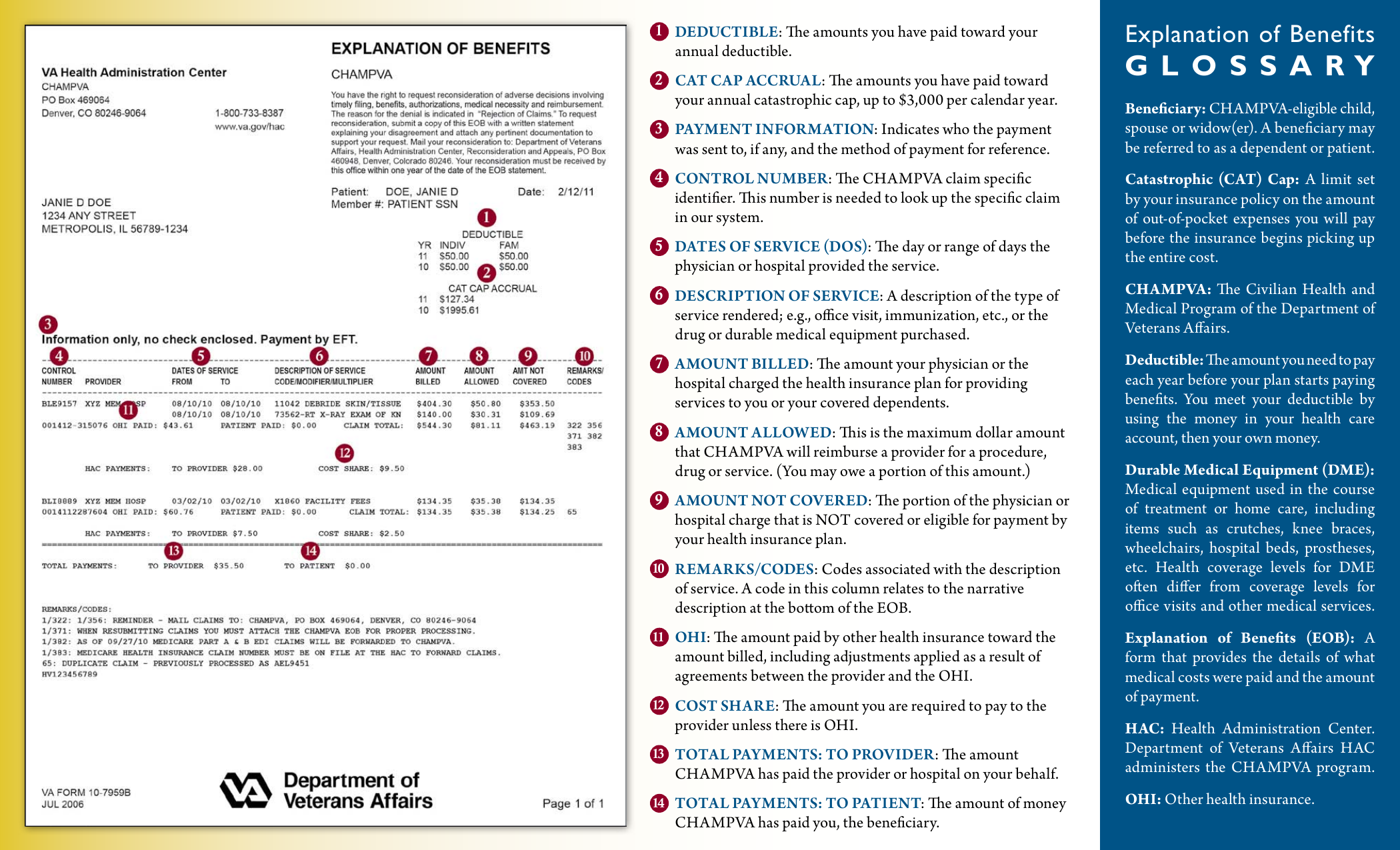
EOB help
An EOB is not a bill. It explains how a claim was processed so you can compare it against the provider bill before paying.
Make sure the care listed is yours and the provider/date match the bill.
What the provider charged before payer adjustments.
The amount the plan recognizes for the service.
The part the EOB says is not eligible for payment.
Payments or adjustments by Medicare, employer insurance, or another payer before CHAMPVA.
What was paid to the provider or reimbursed to the beneficiary.
Amounts that may become patient responsibility. Compare against the provider bill.
Out-of-pocket amounts credited toward the yearly cap.
What the EOB says may still be owed after payer processing.
Reasons more information is needed, why something was denied, or what to review before appeal.
For CHAMPVA, keep the EOB, provider bill, receipts, and any other-insurance EOB together. If the bill does not match the EOB, call the provider billing office before paying.
Provider updates
Submissions are saved for review before appearing publicly. Use this for care providers, pharmacies, hospitals, dental, vision, therapy, mental health, and DME/supplies. Funeral homes are submitted from Death & Burial Benefits. Do not include patient names, claim details, diagnosis notes, or private medical information.
Sign in or create an account before submitting. Searches stay public, but review queues and community posting are member-only.
Start with the immediate need
Choose one task now. The other planning sections remain available when the immediate call or search is complete.
Call early, confirm the service date and location, ask where to send proof of service, and verify whether the funeral director or family should submit the official request.
Search reviewed local leads for funeral homes that may help families request military funeral honors, gather a DD214, coordinate with cemeteries, or work with honors offices.
Burial planning
Use this guide when a family needs to arrange honors, locate proof of service, understand burial benefits, and avoid losing track of survivor follow-up. VA Companion keeps the checklist and script here; official requests still go through VA, the cemetery, the funeral director, or the service branch honors office.
Ask whether they routinely request military funeral honors, what proof of service they need, and who will contact the service branch honors coordinator. Get the service date, time, address, and point of contact written down before calling the honors office.
A DD214 or discharge record is usually the fastest support document. If the family cannot find it, start a records request immediately and ask the funeral director whether they can use temporary proof while the official record is requested.
Confirm the Veteran's branch, service date and time, cemetery or service location, who sends the DD214, and whether the honors detail can provide flag folding, flag presentation, and Taps.
VA burial benefits may help with burial, funeral, transportation, or plot costs when eligibility rules are met. Families commonly use VA Form 21P-530EZ and should keep invoices, receipts, proof of payment, and the death certificate together.
Review cemetery eligibility, headstones or markers, medallions, burial flags, and Presidential Memorial Certificates. These are separate from funeral-home service choices and may require their own forms or cemetery coordination.
After immediate arrangements, review DIC, accrued benefits, survivor pension, CHAMPVA, Chapter 35, burial reimbursement, and any state survivor benefits that may apply.
Call script
Use this script when calling a funeral director, cemetery, county VSO, or military funeral honors coordinator. Keep SSNs and private family details out of email unless the official recipient specifically requires them through a secure channel.
Complete the fields above to build a call script.
Funeral honors updates
Use this for missing military funeral honors offices, military unit contacts, cemetery honors coordinators, or corrected phone and email details. Submissions are reviewed before public listing.
Sign in or create an account before submitting. Do not include SSNs, claim numbers, private medical details, or private family information.
Funeral home updates
Use this for funeral homes, cremation providers, or mortuaries that help families request military funeral honors or coordinate veteran burial arrangements. Do not include SSNs, VA claim numbers, private medical details, or family member private information.
Sign in or create an account before submitting. Entries are reviewed before public listing.
Education and survivor benefits
Veterans, spouses, children, surviving spouses, surviving children, and parents can qualify under different VA programs. Use this guide to sort education, survivor compensation, survivor pension, accrued benefits, CHAMPVA, and burial follow-up before opening the official VA application.
This is a planning guide. VA decides eligibility. If the death, relationship, rating language, school choice, or prior denial is complicated, use the VSO & Reps Search before filing.
For eligible spouses and children. Use VA Form 22-5490 for a first-time DEA or Fry application.
For eligible survivors after a Veteran's death. Use VA Form 21P-534EZ for spouse or child claims.
Survivors may need separate CHAMPVA, burial allowance, marker, flag, and records actions.
Survivors' and Dependents' Educational Assistance can help an eligible spouse or child pay for school or job training when the Veteran or service member meets rules such as permanent and total service-connected disability, service-connected death, line-of-duty death, missing-in-action, captured, or qualifying hospitalization status.
The Fry Scholarship is a separate Chapter 33 education path for certain surviving spouses and children of service members who died in the line of duty, and for some Selected Reserve service-connected deaths. A dependent may need to compare Fry and Chapter 35 before choosing which benefit to use.
The Veteran's own school or training benefits are usually handled through GI Bill, VR&E Chapter 31, transferred benefits, or related VA education programs. Chapter 35 is normally a dependent path, not the Veteran's own benefit.
Dependency and Indemnity Compensation is a tax-free monthly survivor benefit for eligible surviving spouses, children, or parents when the service member died in the line of duty or the Veteran's death was caused by a service-related injury or illness. Past denials may deserve a new look when new service-connection evidence changes the picture.
Survivors Pension can help qualified surviving spouses and unmarried dependent children of wartime Veterans when income and net worth limits are met. Accrued benefits may apply when VA owed the Veteran benefits before death. These are separate from DIC, burial allowance, CHAMPVA, and education benefits.
Dependents usually use VA Form 22-5490 or the VA online application for first-time DEA or Fry claims. After choosing a school or training program, the school certifying official sends enrollment information so VA can process payments.
Start with the Veteran's DD214 or service record, rating decision, death certificate when relevant, marriage or birth records, school acceptance or enrollment details, prior VA letters, medical evidence tied to cause of death when needed, receipts, and any previous denial letters.
A surviving spouse or child may qualify for CHAMPVA when the Veteran died from a VA-rated service-connected disability, was rated permanent and total at death, or met another VA rule, and the survivor is not eligible for TRICARE. CHAMPVA is a separate application from DIC or Chapter 35.
Review Chapter 35 for spouse or child education, CHAMPVA for eligible family health coverage, state benefits, property tax rules, and whether family records are already correct with VA.
Review DIC, Survivors Pension, accrued benefits, burial allowance, CHAMPVA, Chapter 35, Fry Scholarship, service records, and whether a VSO should help connect death evidence to service-connected conditions.
Compare DEA, Fry, transferred GI Bill, state tuition benefits, and school certifying official requirements before choosing a benefit. Some choices can affect how many months remain or which payments are available.
Do not assume the answer is final. A new service-connected condition, PACT Act evidence, toxic exposure evidence, death certificate correction, or medical nexus may change which survivor path should be reviewed.
For eligible spouses and dependents applying for education benefits for the first time, changing benefits, or requesting a new COE.
For surviving spouses and children applying for DIC, Survivors Pension, or accrued benefits after a Veteran's death.
Health coverage, funeral reimbursement, headstones, markers, flags, and memorial certificates use separate steps.
Pay calculator
Choose a rating and household details, then compare current and proposed ratings or estimate rough retro pay.
Practice
Prepare truthful examples, keep private browser notes, and open the matching official DBQ without mixing those tasks together.
Official DBQs
Local copies are hosted on VA Companion for convenience. Every listing keeps the official VA source link so the revision can be confirmed.
Community review
Share a general question and truthful-answer focus for review. Do not submit names, claim numbers, SSNs, diagnosis records, private medical details, or anything you would not want reviewed by an admin.
Sign in or create an account before submitting. Practice and official DBQ searches remain public.
Exposures
TERA is broader than one address list. Search VA presumptive exposure locations and activities, plus EPA military-affiliated Superfund and BRAC cleanup rows, before opening official source pages.
Search results
Web vs Desktop
Use VACompanion.us for shared searches, calculators, guides, forms, chat rooms, provider leads, and account tools. Use the desktop app when you want a private Windows workspace that captures your current VA.gov claim status, ratings data, VA letters, appointments, and other read-only snapshots, then keeps documents, letters, DBQ notes, CHAMPVA planning, exports, licensing, and updates organized locally.
Provider leads, VSO records, forms, guides, state benefits, funeral-home leads, FAQ articles, and release notices.
Your private VA.gov snapshots, local vault records, letters, packets, calculator scenarios, and claim planning notes.
The desktop can read public VA Companion reference data; it does not upload VA.gov credentials, cookies, tokens, claim snapshots, or vault contents.
No VA.gov password capture on the website
No web document vault
Installer downloads are live for signed-in members
Read-only update status is available
Provider / rep signup
This form is for public resource listings: VSOs, accredited representatives, attorneys, claims agents, nonprofits, provider offices, government veteran-service contacts, moderators, fact-checkers, and similar helpers. It is not required for regular website membership.
Veterans, dependents, surviving spouses, and caregivers who only want saved tools, chat posting, or desktop access should use the free member account instead. If you already have a VA Companion account, sign in first so this reviewed profile attaches to your account.
Chat rooms
Browse public conversations, learn from shared experience, and sign in with a screen name when you want to ask questions or reply. Moderators and admins keep rooms organized, move posts when needed, and remove unsafe personal information.
Loading community chat rooms...
Choose a chat room to see active threads.
Threads load after the chat rooms are ready.
Help Center
Find practical answers for website tools, desktop licensing, CHAMPVA, claims, VA health care, education benefits, privacy, and common veteran or dependent workflows.
Loading knowledge base...
Claim Forms
VA Companion stores local VA, CHAMPVA, decision-review, statement, DD214, and related forms for convenience. Official online applications and submissions still happen on VA.gov, National Archives, or another official government site.
Paper application for CHAMPVA when you are not using the official online application.
Guides
Start with these local guides before moving to an official government site for sign-in, filing, record requests, or secure submissions.
Use the official VA site for claim filing, claim status, letters, records, health care, and benefits tasks.
Open VA.gov in New TabRequest service records online through National Archives eVetRecs, or use Standard Form 180 by mail or fax. VA says it will request your DD214 for you when it receives a VA benefits application.
Veterans, service members, survivors, spouses, and dependents may qualify for GI Bill, career counseling, vocational rehabilitation, or other VA education benefits.
Chapter 35 DEA may help eligible spouses and children of veterans or service members who died, are captured or missing, or are permanently and totally disabled due to service-connected disability.
Search local TERA, presumptive-exposure, military Superfund, and BRAC cleanup records before jumping to agency source pages.
Desktop app
Use the website for shared tools, forms, guides, provider leads, chat rooms, and helper/provider participation. Use the desktop app when you want the private Windows command center: it captures current claim status, live ratings data, VA letters, appointments, and other read-only VA.gov snapshots from your own account to help with claims and benefits management, then keeps your evidence, secure document vault, generated letters, DBQ notes, CHAMPVA paperwork, and focused export packets organized locally.
Status
See the current website version, desktop release, member download status, and privacy boundary.
Public tools, hosted forms, guides, provider leads, reviewed provider / representative profiles, chat rooms, and member accounts are live.
Checking the current desktop release for members. The desktop app also checks the server and notifies users in-app when approved updates are available.
Current extension reach: 510 across Chrome 100 users, Edge 405 users, and 5 Safari downloads.
Published versions: Chrome 0.2.2, Edge 0.2.1, Safari 0.2.3.
Chrome and Edge counts come from their public store listings. Safari downloads come from App Store Connect Analytics.
Desktop installer availability will appear here.
The website does not upload VA.gov credentials, MFA codes, cookies, tokens, claim snapshots, local vault documents, or desktop app data.
Support development
VA Companion is an individual project by James Brown, a service-connected disabled Marine Corps veteran who has been through the claims and benefits process personally, with his spouse, and while helping many fellow veterans navigate the same maze.
Support is never required for website membership, desktop licensing, tools, or community access. It simply helps offset the real cost to develop, host, maintain, update, and improve the project.
Use your bank app to send voluntary support. Please verify the recipient shows James Brown before sending.
VA Companion is developed by James Brown, a service-connected disabled Marine Corps veteran. Any amount helps grow and maintain this site, the desktop app, and the resources behind them.

Scan with your bank app. No phone number is published.
Privacy boundary
This website keeps the sensitive desktop-app features off the web. Member accounts can save public-tool work, but VA.gov credentials, claim capture, and document vault features remain outside the website.
No VA.gov passwords or MFA codes
No VA.gov cookies, tokens, or session capture
No document uploads or storage
No access to your desktop vault or local app data
Sources
