Reference Data the Desktop Can Read
Provider leads, VSO and county service office records, funeral-home and military honors leads, claim forms, FAQ articles, state benefits, education and survivor guides, TERA records, and release notices.
 VA Companion
Version 1.01.19 Windows command center
VACompanion.us gives you shared web tools for preparation and lookup. The desktop app adds a private Windows workspace with live claims and ratings data, secure document vault storage, letter and statement generation, appointments, VA letters, and other read-only VA.gov snapshots from your own account to help with claims and benefits management.
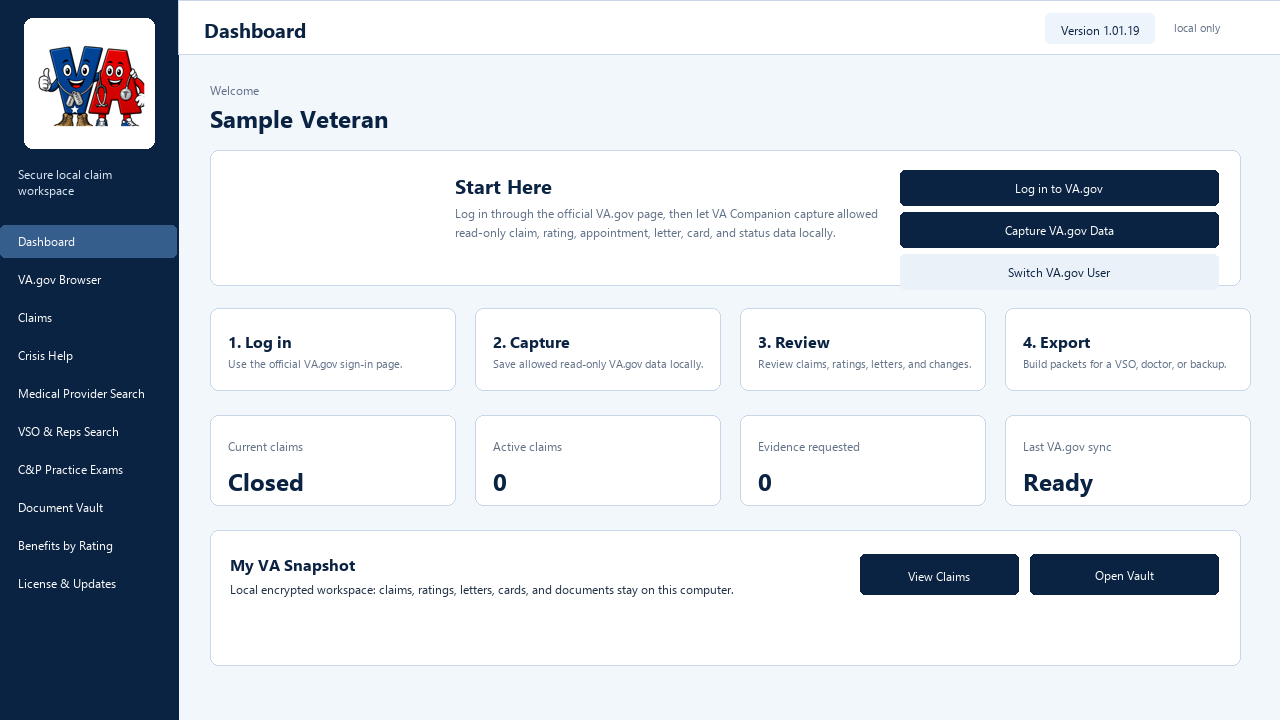 Current sanitized desktop dashboard preview
Website vs desktop app
Public tools stay useful without VA.gov login capture. The desktop app is built for personal claim snapshots, secure local records, generated letters, and appointment-ready export packets.
| Feature | VACompanion.us Website | VA Companion Desktop Application |
|---|---|---|
| VSO and provider lookup | Public search tools, provider leads, CHAMPVA script builder, and reviewed submissions. | Uses the same shared data, with local planning notes and packet export support. |
| Practice exams and calculators | Fast browser tools for DBQ prompts, rating math, pay estimates, and saved member scenarios. | Private local workspace that can apply captured ratings and keep more detailed prep notes. |
| Live VA.gov claim and rating snapshots | Not collected on the website. | Desktop only: signed-in VA.gov browser session, read-only auto-capture that syncs claim and rating status, local encrypted snapshots, live-status planning, and one-click use of your actual data in calculators and tools. |
| Secure document vault | No document uploads or web vault. | Desktop only: encrypted local storage for VA letters, claim files, Blue Button records, and evidence. |
| Letters, statements, and packets | Public call scripts and guided builders for shared workflows. | Full local letter, statement, condition packet, CHAMPVA packet, and appointment export tools. |
| Forms, guides, and exposure data | Hosted forms, CHAMPVA guide, TERA/Superfund search, EOB reading help, and community chat rooms. | Can sync public reference data while keeping personal claim work on the Windows computer. |
| Registration and licensing | No-charge member accounts for saved web work, submissions, forum posting, and future customer access. | Demo or Registered mode. No-charge desktop registration is tied to VACompanion.us membership and can activate from inside the app. |
Desktop sync plan
The website is becoming the shared reference database for public tools, while the desktop app remains the private Windows workspace for personal VA.gov snapshots and local records.
Provider leads, VSO and county service office records, funeral-home and military honors leads, claim forms, FAQ articles, state benefits, education and survivor guides, TERA records, and release notices.
VA.gov claim and rating snapshots, local document vault records, letters, packets, calculator scenarios, claim notes, cookies, tokens, usernames, passwords, MFA codes, and local database contents are not uploaded to VA Companion servers.
The desktop app checks the VACompanion.us release manifest at startup and from License & Updates. When an approved update is available, the app shows an in-app update notice and opens the member download flow.
As website data matures, the desktop app can add read-only sync views for the Knowledge Base, death and burial benefits, state benefits, education/survivor guidance, provider search, and VSO directory updates.
Why upgrade
Uses an official VA.gov browser session to gather allowed read-only personal snapshots after the user starts capture, including claim status, ratings, letters, appointments, and other account-specific data.
Imports user-downloaded VA letters, proof-of-service cards, claim letters, and Blue Button files into an encrypted local vault with search, categories, and packet export.
Includes a self-contained DBQ knowledge base, official form links, guided exam modules, practice-answer review, and local examiner worksheet views.
Brings together CHAMPVA guide references, provider leads, CITI planning, birth and delivery search, prescriptions, dental/supplemental notes, and EOB reading help.
Guides truthful buddy statements, personal statements, family impact statements, symptom journals, claim timelines, nexus-letter requests, and C&P prep notes.
Combines VA math, bilateral-factor detection, what-if next-tier guidance, dependent compensation estimates, SMC-L planning estimates, and rough retro calculations.
Builds focused VSO, doctor/C&P prep, CHAMPVA, and personal-backup packets with summaries, evidence checklists, documents, CSV indexes, and PDF reports.
Keeps VA.gov passwords, MFA codes, cookies, session tokens, request headers, and raw VA.gov profile details out of saved records, reports, and export packets.
Approved desktop updates are posted to VACompanion.us. The app checks for them automatically and displays an update notice inside the app, so members do not have to search for a new installer.
App interface previews
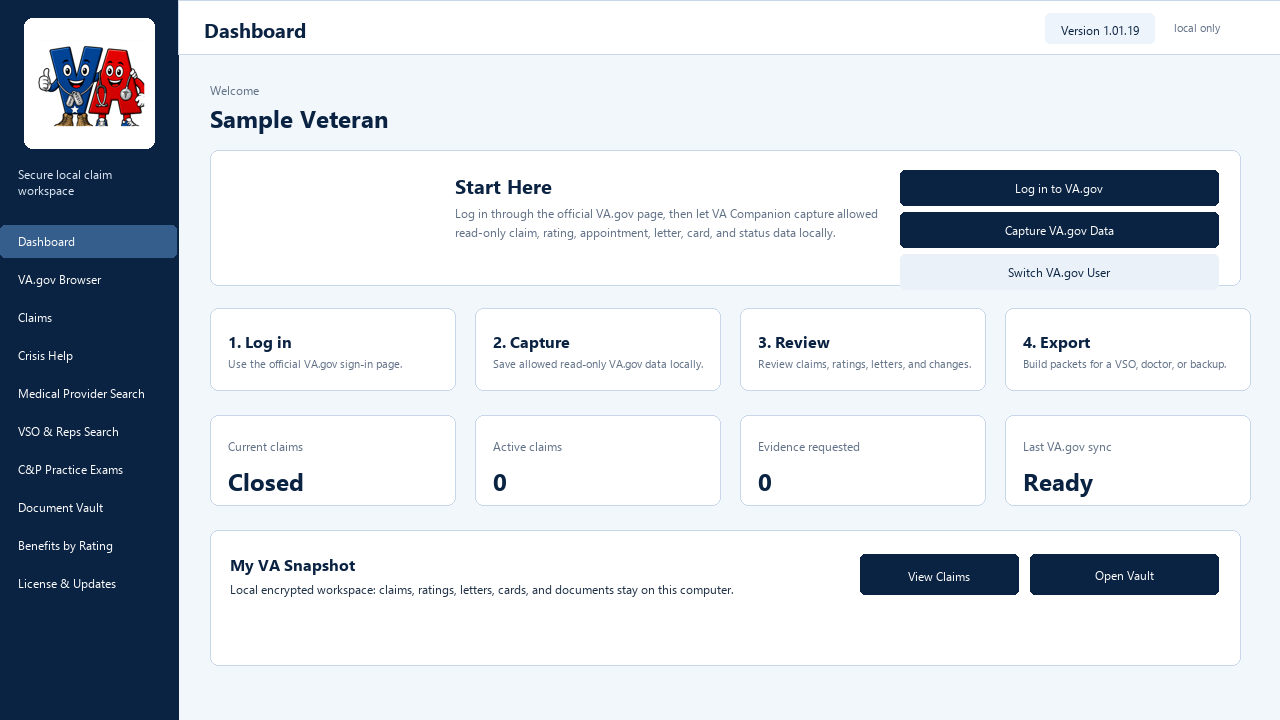
Start Here flow, snapshot cards, last-capture health, claim counts, letters, and one-click actions for captured VA.gov data.
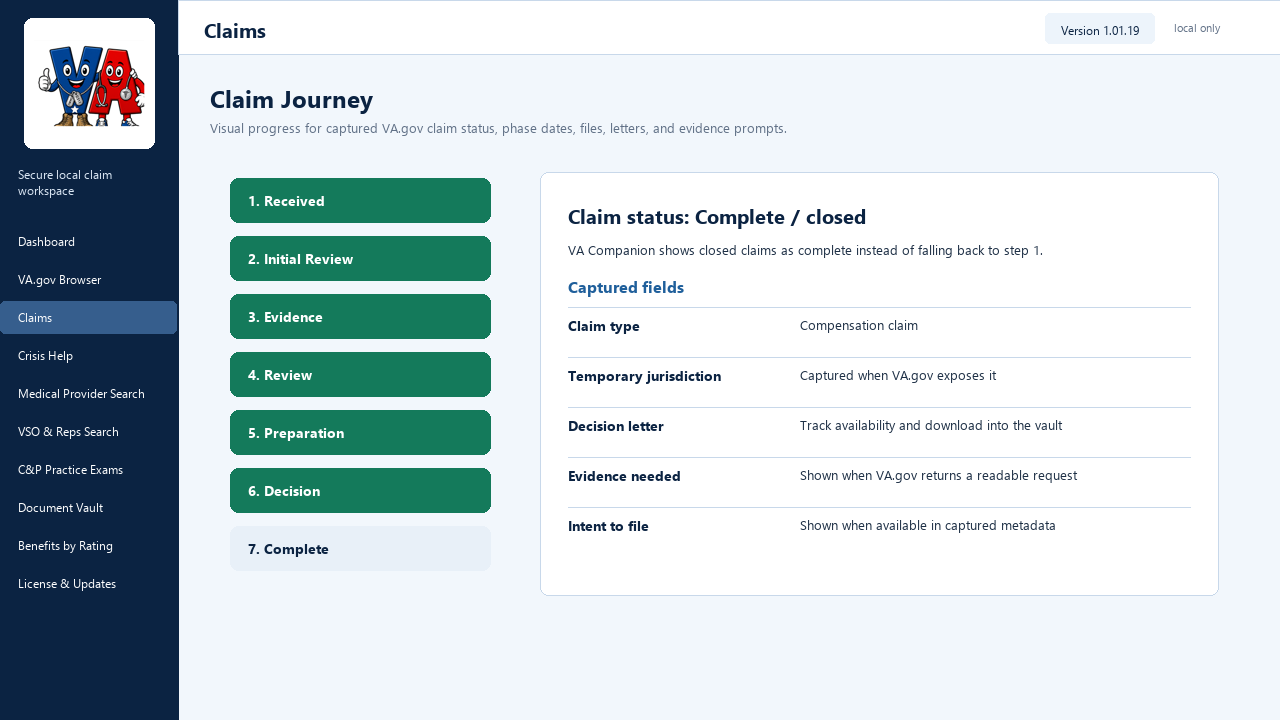
Visual claim stage tracking, readable status details, evidence prompts, phase dates when VA.gov exposes them, and privacy-safe local snapshots.
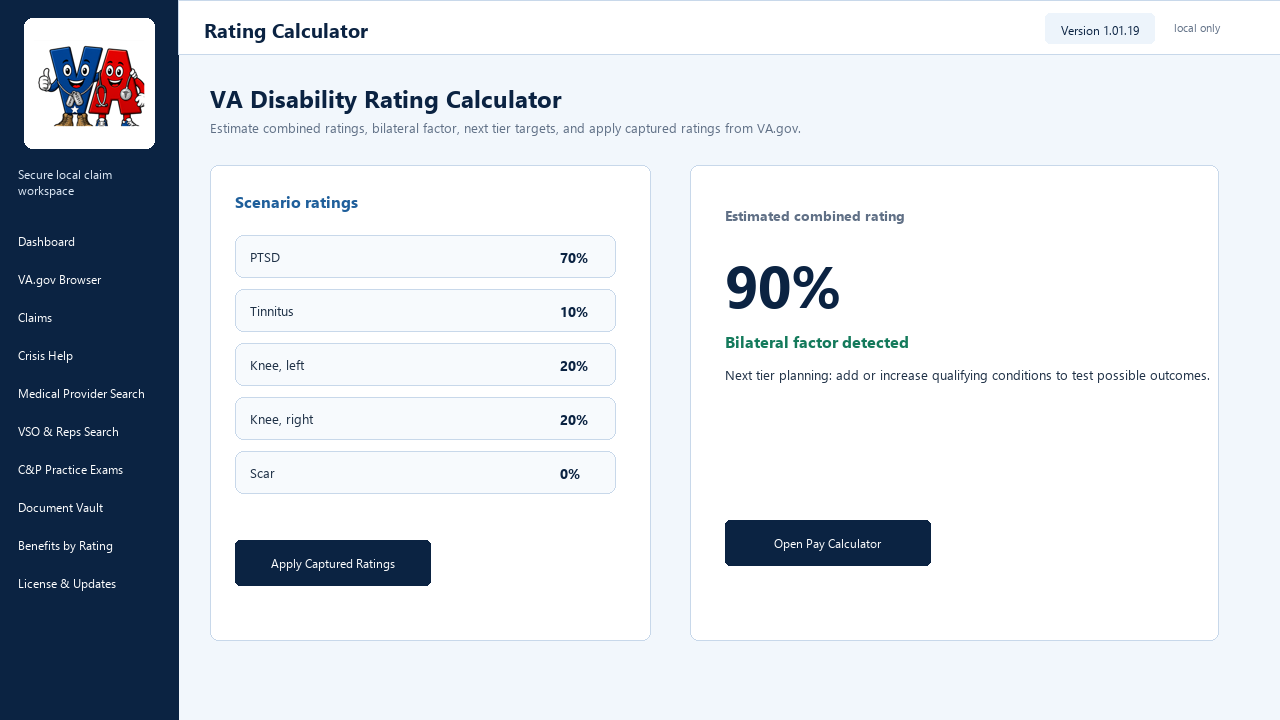
VA math, bilateral-factor detection, scenario rows, next-tier planning, and one-click handoff to the compensation calculator.
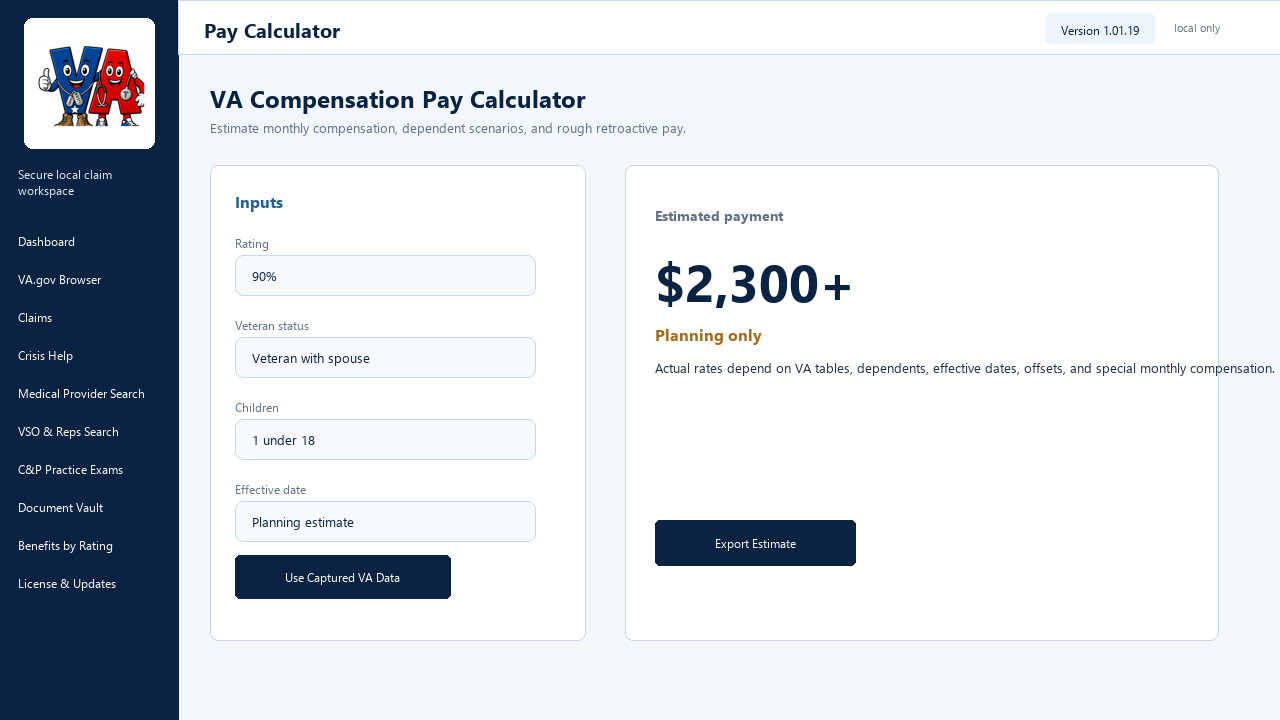
Monthly and annual estimates, dependent fields, current-vs-proposed scenarios, rough retro math, and captured-data assist buttons.
Quick start manual
This is the public manual-style summary from the desktop app. It avoids protected VA.gov details while explaining what a new user should do first.
Use the dashboard as the landing page for rating snapshots, captured claim data, letters, appointments, prescriptions, compensation estimates, and capture health.
Sign in only through the official VA.gov, Login.gov, ID.me, or DS Logon flow shown inside the secure browser. The app does not ask for or store passwords or MFA codes.
Use Capture All VA.gov Data to check known signed-in VA.gov sources for claim status, ratings, letters, appointments, prescriptions, and Blue Button status data.
The Capture Review board shows found, unavailable, and not-yet-checked sections. If VA.gov does not expose a field, the app says unavailable instead of inventing data.
Open Claims for journey status, temporary jurisdiction, evidence needed, files received, exams, decision letters, and recent changes. Use the disability tool to apply captured ratings.
Use Document Vault for VA.gov downloads, benefit letters, proof-of-service cards, claim letters, Blue Button records, generated statements, and evidence files.
Use Condition Workspace and packet builders for VSO, attorney, doctor/C&P prep, buddy-letter, personal-statement, CHAMPVA, backup, or full folder exports.
Use DBQ prep, compensation estimates, CHAMPVA planning, EOB tools, statement builders, and Reports / PDF Export before appointments or representative meetings.
Create a free VACompanion.us member account, install the desktop app, then activate the no-charge member license from License & Updates. Members can keep two active personal computers by default.
Use License & Updates to check for newer releases, open the member download page, and verify the installer before installing a newer build.
Licensing and updates
The desktop app checks VACompanion.us for newer releases and can read public VA Companion reference data for providers, guides, forms, and exposure records. These checks are read-only and do not upload veteran data, VA.gov credentials, documents, cookies, tokens, claim snapshots, or local app data.
When an approved desktop update is posted, VA Companion notifies the user in the app. Members can open License & Updates, review the release notes, download the approved installer, and return to the app after installation.
VA Companion is an individual project by James Brown, a service-connected disabled Marine Corps veteran who has been through the claims and benefits process personally, with his spouse, and while helping many fellow veterans navigate the same maze.
Registration and desktop licensing are no charge for registered VACompanion.us members. Voluntary support helps offset the real cost to develop, host, maintain, update, and improve these tools, but support is never required for website membership or desktop licensing.
Lets the app run as a trial without locking a veteran away from local records, review, backup, or export tools.
No-charge licensing is tied to VACompanion.us membership. The desktop app can request and save a member license automatically from License & Updates.
Members can keep two active personal computers by default. Retire an old computer from the website account, then register the replacement machine ID.
Controlled release channel. Installer delivery is member-gated through a free VACompanion.us account and no-charge desktop activation.
The desktop app checks the same server release manifest and notifies users in-app when a newer approved build is available.
Download Product Brochure Download Product Overview View Release DetailsSupport development
VA Companion is an individual project by James Brown, a service-connected disabled Marine Corps veteran who has been through the claims and benefits process personally, with his spouse, and while helping many fellow veterans navigate the same maze.
This project is meant to support fellow veterans and dependents, but it is not without a significant cost to develop, host, maintain, update, and improve. Any voluntary support is greatly appreciated and does not affect registration, membership, desktop licensing, or access to tools.
Distribution boundary
Installer delivery is controlled through free VACompanion.us member registration. Sign in before downloading, then activate the no-charge desktop license inside License & Updates in the app.
Signed-in member download
Free website registration
No-charge member license
Private desktop files stay local